


Mobile Robotics Studio: Safety | License incl. 1h expert coaching
1.200,00 € / year
excl. 19% VAT
Description
The Mobile Robotics Studio is your professional toolkit for demanding projects with mobile robots. This module – Safety – is your specialized solution for the design and visualization of safety fields for AGVs, AMRs and AGVs.
With this package, you not only receive the powerful Mobile Robotics Studio: Safety for planning your safety fields, but also a personal 1-hour expert workshop to get you started right away.
Mobile Robotics Studio: Safety
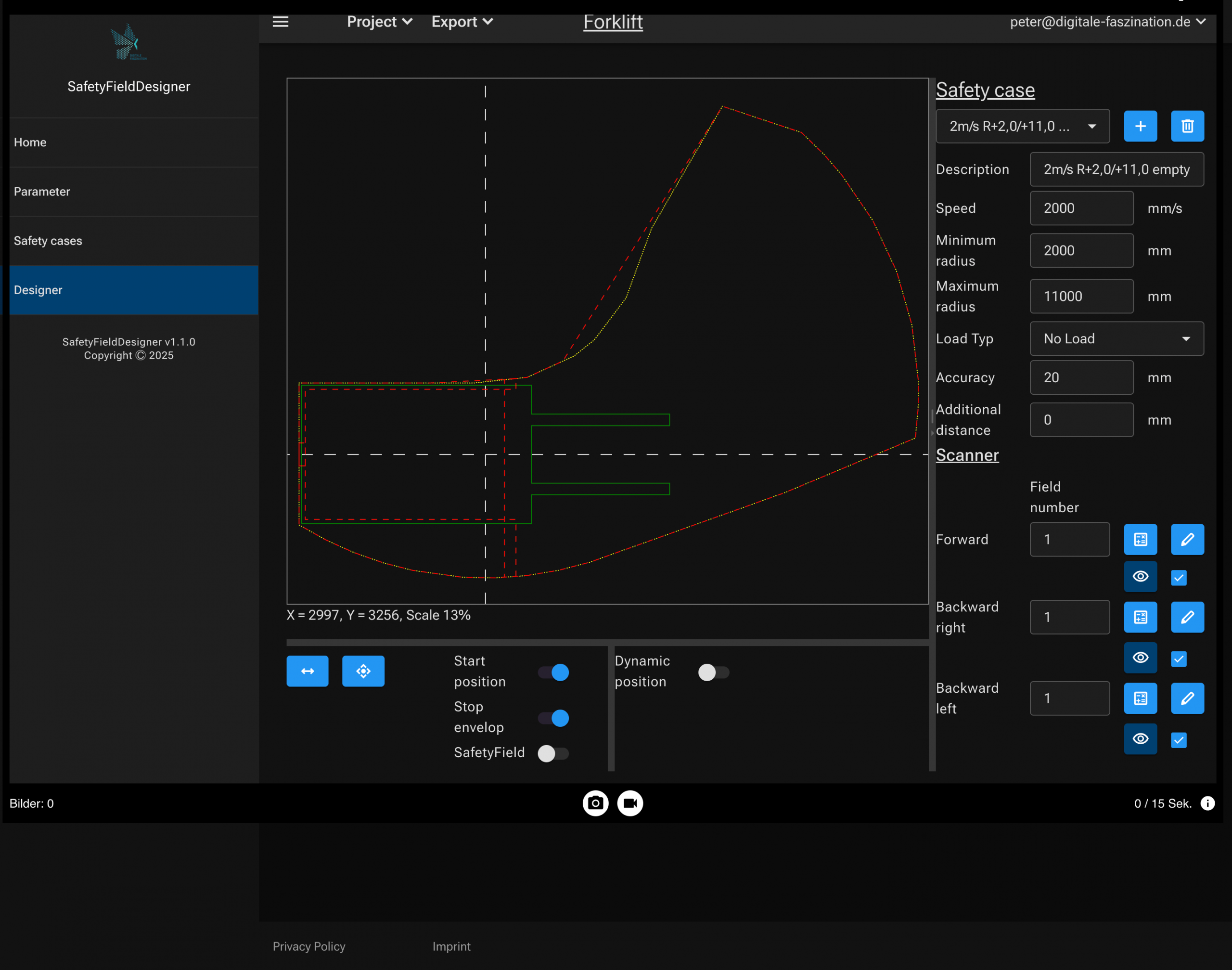
Based on the kinematic model “differential, tricycle or Ackermann”, the contour of a mobile robot can be modelled and visualized almost true to the original. Parameterizable drive parameters supplement the kinematic model and allow a detailed simulation of the driving behavior. Depending on requirements, the user can optionally create and visualize one or more contours for payloads to be transported. Mobile robots – especially in industrial environments – require safety-related protection. The tool offers a wide range of different safety laser scanners from various manufacturers in various configurations. One or more scanners can be freely parameterized and placed in any orientation to complete the detailed simulation of the mobile robot. Using predefined driving scenarios, the driving behavior can be simulated and analyzed in all conceivable situations. The distance actually “driven” and the area “driven over” are visualized. The tool demonstrates its true strength when calculating and visualizing the safety fields required. The fields are determined based on the area actually “covered” and include parameters such as reaction time, foot protection allowances, freely configurable allowances, etc. into the calculation. The finally determined field sets can be exported and loaded as a file import in the preselected scanner! The nanoScan3, microScan3 and outdoorScan3 safety laser scanners from Sick are currently supported.
The perfect start begins with our comprehensive online training videos, which are available to you at any time. Get to know the user interface, the core functions and the basic workflow at your own pace.
Expert coaching
We deepen your knowledge in a one-hour, personal online consultation with one of our experts. This exclusive coaching is designed not to repeat the content of the online training videos, but to build on it. We use the time efficiently to clarify your specific questions that have arisen from the videos or while working on your own project. Together we can discuss complex use cases, discuss best practices for your design or discuss detailed questions about ISO 3691-4.
License & important notes
Contract details
With your purchase, you acquire a bundle consisting of an annual license for the use of the Safety module and a one-time 60-minute online coaching session. The license agreement is concluded for an indefinite period and is automatically renewed after one year if it is not terminated in due time. The coaching must be used within the first 12 months of the contract term. After the purchase, we will contact you to arrange an individual appointment for the online coaching.
Number of users
This license includes 3 personal user accesses for employees of your company.
Language of the software:
The user interface and all menus within the software are only available in English. A basic knowledge of English is required to use the tool.
Right of use
The license entitles you to use the software for your own internal business purposes. The use of the software to provide services for external third parties (e.g. as a consulting or planning service for your customers) is expressly prohibited.
Delivery & provision
Type: Digital provision of access data by e-mail.
Delivery time: Within 2 working days after successful receipt of payment.
Responsibility of the user & exclusion of liability
Mobile Robotics Studio: Safety is a powerful tool that supports you in the planning and visualization of safety fields. However, the tool and its interfaces are not certified safety components. The sole and complete responsibility for creating, checking and commissioning a safe mobile robot lies with the user.
The tool never replaces the expertise and due diligence of a qualified engineer.
The process must include the following steps:
- Careful planning in the tool: The results obtained with the software serve as a basis for planning. The user is responsible for the correct input of all parameters (e.g. speeds, braking distances) and must check the results for plausibility.
- Verification in the scanner software: As the data transfer to the configuration software of the safety laser scanner is not safe, the user must carefully check and verify the field data in the configuration software of the safety laser scanner.
- Validation on the real system: After configuration, extensive system tests on the real mobile robot are absolutely essential. The function and effectiveness of the protective and warning fields must be validated in practice, for example in accordance with the procedures in ISO 3691-4 or other applicable standards. Only after successful validation may the mobile robot be put into operation or placed on the market.
We assume no liability for damages resulting from faulty planning, missing or insufficient verification or missing or insufficient validation of safety systems.
System requirements
To ensure that Mobile Robotics Studio: Safety functions smoothly and without errors, the following system requirements must be met. Use on unsupported systems (especially mobile devices) is not intended and can lead to display errors and functional restrictions.
Supported configuration:
Device: Desktop PC or laptop
Operating system: A current operating system (e.g. Windows 10/11, macOS) that supports the latest version of Google Chrome.
Browser: Google Chrome in the latest stable version. This is the only officially tested and supported browser.
Internet: A stable and fast broadband internet connection.
Recommended hardware:
Screen: A monitor with a resolution of at least Full HD (1920×1080 pixels) is strongly recommended for a clear display.
Reviews
There are no reviews yet.